![connect-fibre-logo-whie.png]](https://www.connectfibre.co.uk/hs-fs/hubfs/emails/connect-fibre-logo-whie.png?height=40&name=connect-fibre-logo-whie.png)
Factory Resetting a Phone Adapter:
- Disconnect the Ethernet cable from the blue 'web' port.
- Push a pin or paperclip into the Reset Button hole and hold until the lights on the top of the device flash.
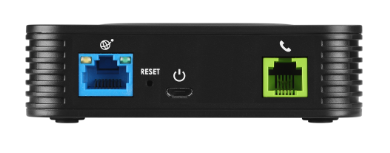
- Disconnect the Power Cable.
- Next, reconnect the Ethernet cable in the blue 'web' port.
- Reconnect the Power Cable.
- Please allow 5-10 minutes for the device to come back online. The lights may go on and off during this time.
- Once you have 3 solid blue lights , please test with a call.