.png?width=200&height=86&name=cf_logo_black%20(2).png)
Check your setup
To start, please make sure that your current setup is correct, and that your service is live.
-
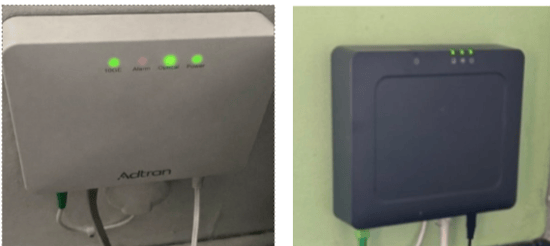
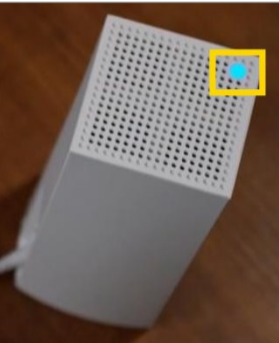
There should be 3 green lights on your ADTRAN ONT, and your Linksys light should be a solid blue. As below:
ONT(fibre box on the wall):
Linksys Router:
Setting up the New TP Link Router
-
Once confirmed, please turn off BOTH devices, for 15 minutes. The easiest way to do this, is via the sockets.
-
Once both have been off for 15 minutes, please disconnect the ethernet cable from the INTERNET port, on the back of the Linksys. (Leave the ethernet cable connected to the ONT port, we'll use it in the new router.)
-
Set the Linksys router and it's power cable brick to one side as we won't need either now!
-
Please unbox the new TP Link router, and get the new power cable ready. (Please ensure you're using an 810/610 for your main router. The smaller 210 nodes are for mesh only!)
- Connect the ethernet cable from the ONT into the WAN/LAN port on the back of your new TP Link router (image below)
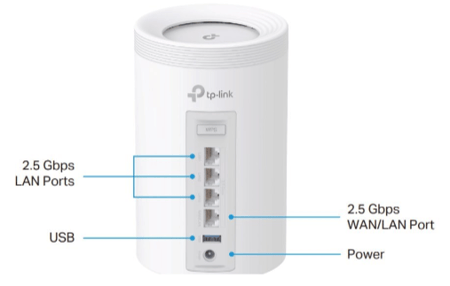
- Plug in your new power cable and connect it into the power port of the router.
- Turn on your ONT (fibre box on the wall) first and wait until you have two solid green lights.
- Once you have two green lights turn on your new TP Link router. The new router will cycle through different light combinations before settling on green and you'll see a third flashing green light come on on the ONT.
- This process can take up to ten minutes to please be patient.
- Once the router is green you have your new connection! Please connect your devices to the new network using the wireless password on the bottom of the router.
- Please now reconnect all of your devices to your new router's network!
For help setting up the TP Link Aginet app please take a look here: How do I set up and use the TP Link Aginet app?
If you have received some smaller 210 units, let's get those connected with this guide: How to set up my TP-Link Mesh system?
if you need to check the lights on your new equipment, that guide is here: What do the lights on my TP Link Router & Mesh mean?
If you have any issues with this process, please call our Customer Service Team on 01223 080790.