.png?width=200&height=86&name=cf_logo_black%20(2).png)
This guide will help you identify if the issue is with the ONT, Router or a MESH node.
Firstly, identify what piece of equipment is not working. Most Connect Fibre customers will only have two pieces of equipment, the Adtran ONT (wall mounted device), and a router, either Linksys or TP-Link.
ADTRAN ONT CHECKS:
To start, please check your Adtran ONT (box on the wall) - there should be 3 green lights on the device, as below: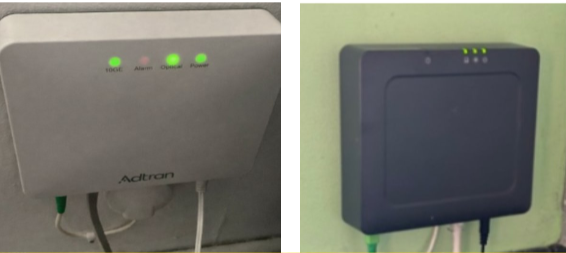
If your ONT shows anything different to this, run through the checklist.
No lights at all - this means your ONT has a power issue. please check:
-
The power cable is secure and not damaged
-
A new socket/extension - do other devices work on that socket?
-
The power adaptor is the one intended for the ONT, and not the router. Specs are as follows:
2GB customers: 12v 1.5A - check the label
1GB/500mb/250mb/150mb customers - 12v 0.5A - check the label
No 2.5GE/10GE - means the ethernet cable between the ONT and Router is either loose or faulty, as the link is down between your networking devices. Please check:
-
The cable is secure in both the ONT and either your WAN/LAN (TP-Link) or INTERNET (Linksys) ports. If necessary, re-seat the cable by removing it, and plugging it back in to the devices
-
The cable is not damaged
-
Try a new CAT6 ethernet cable. Please do not use CAT5 as this will limit your network to 100mbps
Optical - If this light is red, shown below, you potentially have an issue with the Fibre line into the home. 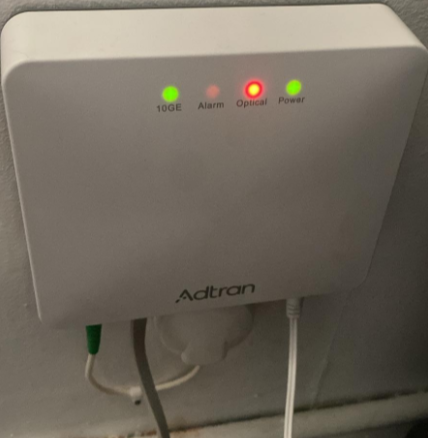
Please check the following:
-
There is no damage to the internal fibre cable, shown above on the left. It should be secure. Do not attempt to remove this, as this is fibre it is extremely delicate and may result in your fibre being damaged further.
-
The ONT itself is not damaged
-
The external line into the home (if visible) is not damaged - have any works taken place around your home that you are aware of?
- Please power the ONT off for 15 minutes, and then power on. If this does not resolve the red optical, please call our team on 01223 080790
Router/MESH checks:
If your Adtran ONT is displaying 3 green lights, the issue may lie with your router or MESH node(s) - please check the lights that the equipment is showing you
Linkys Guide: What do the lights on my Linksys Router & Mesh mean?
If your Linksys light is red, please call our team on 01223 080790
For our TP-Link models, the guide is here: What do the lights on my TP Link Router & Mesh mean?
Common Causes for No Connection on Router/Mesh:
- Loose or faulty ethernet link cable between the router and ONT - check your 2.5/10GE light on the ONT, and check the WAN/LAN or INTERNET port is in use
- Incorrect power adaptor used - please check your specifications on the routers power brick label match the following:
MX5500 (Linksys) - 12v 2A
MX4200 (Linksys) - 12v 3A
TP-Link 810 (2GB customers) - 12V 5A
TP-Link 610 - 12V 2.5A
TP-Link 210 - 12V 1.5A - Device needs a reset, for those guides see here:
Linksys: How do I factory reset my Connect Fibre Linksys router?
TP-Link: How to factory reset my Connect Fibre TP-Link router? - MESH node is not configured, please see the guides here:
Linksys: How to set up your Linksys Mesh Node
TP-Link: How to set up my TP-Link Mesh system?
If you need assistance with this, please call the team on 01223 080790 - Poor signal between the main router, and MESH node - try a relocation
- Damage to the equipment - check the router/MESH physically
- Have you logged into the Aginet or Linksys app and made any changes? If so, revert them or reset the router back to defaults
If you are still experiencing issues once all the relevant checks across all your Connect Fibre equipment has been checked and you have restarted your equipment for 15 minutes, please call our team on 01223 080790.